Install guide · Verified sources

How to Download the CryptoGuru App Safely (iOS, APK & Desktop)

Getting the CryptoGuru app is easy — getting the real one and not a look-alike clone is the part people skip. Here’s the safe way to install on iPhone, Android (Play Store or APK) and desktop.

ℹ️ Not the official CryptoGuru site crypto-guru.app is an independent educational guide, not affiliated with CryptoGuru. CryptoGuru is a virtual trading simulator.

Simulator CryptoGuru app download for iOS and Android
CostFree
PlatformsiOS · Android · Web

Downloading an app feels trivial, and 99% of the time it is. But crypto is the one category where a single wrong tap — a clone app, a malicious APK — can compromise your device or your real accounts. So we’ll treat the install like a security checkpoint, not an afterthought.

Reminder before you begin: CryptoGuru is a trading simulator. You’re installing a learning tool, not opening a brokerage. That actually lowers your risk (no real funds move through it) but doesn’t eliminate it — a fake “CryptoGuru” could still be malware wearing a familiar name.

Step zero

Before you install — a 20-second safety check

🔎

Search, don’t click

Open the App Store or Google Play and search “CryptoGuru” yourself. Avoid download links from ads, emails or chat messages.

🧑‍💻

Check the developer

Note the developer/publisher name on the official listing and make sure it matches. Clones copy the icon but not the verified publisher.

Read the reviews

A genuine app has thousands of reviews over time. A brand-new listing with five glowing reviews is a red flag.

🔒

Update your OS

Install on a phone with current security patches. Old, unpatched devices are the easiest to compromise.

iOS

Downloading on iPhone & iPad

Apple’s App Store is a walled garden, which works in your favour here — apps are reviewed and sandboxed. To install:

  1. Open the App Store and tap the search tab.
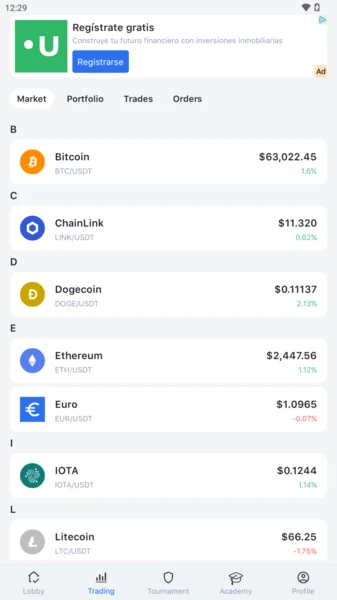
  2. Search for CryptoGuru and confirm the publisher and screenshots match the official product (a trading simulator with tournaments and an academy).
  3. Tap Get, authenticate with Face ID / Touch ID, and let it install.
  4. Open the app and create your account — see our login & sign-up guide.

iOS won’t let you sideload from random websites without deliberate effort, so if a page tells you to install a “special iOS version” via a profile or configuration file, close it immediately. That’s a classic malware vector.

Android

Google Play vs the APK question

Android gives you two routes, and the difference matters:

Google Play vs APK sideload
Google PlayAPK sideload
Malware scanningYes (Play Protect)No — you’re on your own
Auto-updatesYesManual
Clone riskLowerHigh
Recommended for beginnersYesNo

Our recommendation: use Google Play. Open the Play Store, search CryptoGuru, verify the developer and review history, then tap Install. Play Protect scans the package and keeps it updated automatically.

If you have a specific reason to sideload an APK, only do it from a source you completely trust, and understand that you’re disabling the store’s safety net. The overwhelming majority of “CryptoGuru APK” downloads floating around forums are either outdated or repackaged with unwanted extras. When in doubt, don’t.

APK warning

A modified APK can steal everything on your phone. Because this is a free app on Google Play, there is almost never a legitimate reason to hunt for an APK elsewhere. If a site pushes you toward one “to unlock features,” leave.

Desktop

Using CryptoGuru on a computer

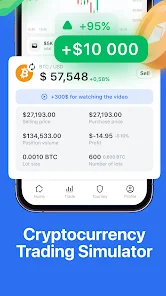
CryptoGuru interface that also works in a browserSame interface, bigger screen

CryptoGuru is designed phone-first, but you have options on a laptop or desktop:

  • Web browser. Where a browser version is offered, you can trade the simulator on a bigger screen — handy for studying charts.
  • Android emulator. Advanced users run the Android app inside an emulator on Windows or Mac. It works, but it’s fiddly and only worth it if you really prefer a keyboard-and-mouse workflow.

For most people the phone app is the best experience — it’s what the tournaments, notifications and quick practice sessions are built around.

Defence

How to spot a fake CryptoGuru

Impersonation is the real threat with any popular crypto app. Run through this list before trusting any download:

🆔

Wrong developer name

The icon matches but the publisher doesn’t. Always cross-check against the official listing.

📅

Suspiciously new

A “CryptoGuru” app published last week with a handful of reviews is not the real one.

💬

Asks for real money/keys

The genuine simulator never needs your seed phrase or a crypto deposit to “activate” it.

🔗

Came from an ad or DM

Links from sponsored posts, Telegram groups or emails are the most common clone vectors. Go to the store directly.

Two-line safety reminder

Install only from official app stores, and never enter a seed phrase or send real crypto to “finish setup.” A simulator needs neither.

After install

What to do in your first five minutes

Once the app is on your phone, a little setup discipline pays off. Here’s a sensible first-run routine:

  1. Create your account properly. Use a real email you control and a unique, strong password. Our login & sign-up guide covers this and 2FA in detail.
  2. Review app permissions. A trading simulator has no legitimate reason to demand your contacts, SMS or precise location. On Android, check Settings → Apps → CryptoGuru → Permissions and revoke anything that feels excessive. Push notifications and network access are normal; deep device access is not.
  3. Explore in practice mode first. Poke around the market list, open a chart, place a throwaway trade. Nothing you do here costs anything, so experiment freely.
  4. Find the academy. The built-in lessons are the fastest way to make the rest of the app make sense.

Because the app is a simulator, it should never ask you to link a bank card, connect a real crypto wallet, or verify your identity with documents just to use the demo. If it does, you either have a fake copy or you’ve wandered into something that isn’t the simulator — stop and re-check the source.

Permissions: normal vs suspicious
Permission requestVerdict
NotificationsNormal — for tournament/price alerts
Network / internetNormal — needed for price data
Contacts / SMSSuspicious — no reason for a simulator
Send real crypto / connect walletRed flag — a demo needs neither
ID documents to use the demoRed flag — likely a fake or phishing
Staying current

Updates, storage and keeping the app healthy

A quick word on the boring-but-important maintenance side, because an out-of-date app is both buggier and less secure. If you installed through the App Store or Google Play, updates are handled for you — the store pushes new versions automatically. That’s one more reason we steer beginners away from sideloaded APKs, which you’d have to update by hand and which quietly rot into stale, vulnerable versions.

The app itself is lightweight. As a simulator, it isn’t downloading a blockchain or syncing a real ledger, so it won’t chew through storage the way some crypto apps do. If it ever starts misbehaving — freezing, failing to load prices, or acting strangely after an update — the usual fixes apply: force-close and reopen, check your connection, clear the app’s cache, or reinstall from the official store as a last resort. None of that risks anything, because there’s no real balance to lose.

iOS vs Android: which experience is better?

Honestly, they’re close, and your choice of phone matters more than any difference in the app:

  • iOS tends to feel slightly more locked-down and consistent, and Apple’s review process makes clone apps marginally rarer on the App Store.
  • Android is more flexible and far more common globally (and in markets like Nigeria), but that openness is exactly why you must resist unofficial APKs.

Either way, the simulator plays the same. Pick the platform you already own, install from its official store, and spend your energy on learning to trade — not on hunting for a “better” build that doesn’t exist.

FAQ

Frequently asked questions

Is the CryptoGuru app free to download?

Yes, the app is free to install from the official stores. As a free app it may include ads or optional in-app items. Because it’s a simulator, there are no real trading fees or deposits.

Is there a CryptoGuru APK?

Android apps can be distributed as APK files, but the safest route is Google Play, which scans for malware and handles updates automatically. Only sideload an APK from a source you fully trust — malicious clones are the number-one risk with APKs.

Can I use CryptoGuru on a PC or Mac?

CryptoGuru is mobile-first. Desktop access is typically via a web browser or an Android emulator. The phone apps are the intended, best-supported experience.

How do I know I’m downloading the real app?

Check the developer name matches the official listing, look at the review count (clones have few reviews), and always start from the store search rather than a link in an ad or DM. See our fake-copy checklist below.

Want a platform where the balance is real?

The simulator is the safe first step. When you’re ready to trade real crypto — real deposits, real withdrawals, real charts — install a regulated live app instead and start with an amount you can afford to lose.

Open a Live Account

Partner link — opens a third-party exchange. Not affiliated with CryptoGuru.