
How-to · Beginner friendly

How to Trade on CryptoGuru: A Step-by-Step Beginner Walkthrough

CryptoGuru is the safest place to make your first trade — because the money is fake. This walkthrough takes you from opening the market list to placing a buy, setting a stop-loss, and closing a position, with the reasoning behind each tap.

ℹ️ Not the official CryptoGuru site crypto-guru.app is an independent educational guide, not affiliated with CryptoGuru. CryptoGuru is a virtual trading simulator.

Simulator CryptoGuru market list ready to place a trade
RiskZero (virtual)
You’ll learnOrders + risk

The best thing about learning to trade on CryptoGuru is that your first mistakes are free. You will make them — everyone buys the top and panic-sells the bottom at least once — and doing it here, with virtual money, is exactly the point. This guide walks the full loop of a trade and, just as importantly, the thinking that should sit behind each step.

One honest caveat up front: a simulator teaches the mechanics of trading brilliantly and the emotions of trading barely at all. Losing fake money doesn’t sting, so discipline is the one thing you’ll still have to learn for real. We’ll flag where the gap matters.

Step 1

Read the market before you touch anything

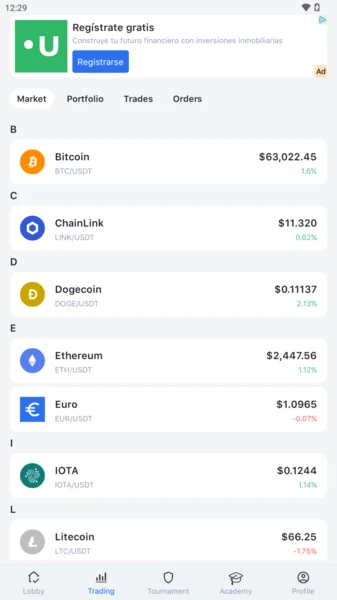
CryptoGuru market list of trading pairsThe Market tab

Open the Market tab and you’ll see a list of pairs — BTC/USDT, ETH/USDT, SOL/USDT and more. The format is asset / quote currency: BTC/USDT means you’re pricing Bitcoin in a dollar-pegged stablecoin.

Tap a pair to open its chart. Before you even think about buying, answer three questions:

  • Which way is it trending? Up, down or sideways over the last hours and days.
  • Where’s the current price relative to recent highs and lows?
  • What’s your plan? The single most useful habit: decide your entry, your exit, and your “I was wrong” price before you click.
Step 2

Place a buy order

With a plan in hand, tap Buy. You’ll be asked for two things: the order type and the amount.

  1. Pick an order type (market or limit — explained below).
  2. Set the amount of virtual balance to commit. Resist the urge to go all-in just because it’s fake. Practise sizing as if it were real: risking a small slice per trade is how professionals survive.
  3. Review and confirm. The app shows your entry price and the position appears in your portfolio with a live profit/loss figure.

That’s it — you’re “in.” Now the number turns green and red as the reference price moves. Watching that swing is the whole education.

Step 3

Order types, explained plainly

Two order types cover almost everything you’ll do as a beginner:

Order types at a glance
Order typeWhat it doesUse it when
MarketBuys/sells instantly at the current priceYou want in or out right now and price precision doesn’t matter
LimitWaits to fill until price hits a level you setYou want a specific price and are willing to wait
Stop / stop-lossTriggers a sell if price drops to your levelAlways — to cap how much a trade can lose

A beginner’s rule of thumb: use limit orders to enter with discipline, and always pair a position with a stop-loss to exit before a small loss becomes a big one.

Step 4

Stop-loss and take-profit: your safety rails

This is the most valuable habit CryptoGuru can teach, so practise it on every single trade:

  • Stop-loss. A price below your entry where the trade auto-closes, capping the loss. It removes emotion from the worst moment — the app exits for you instead of you “hoping it comes back.”
  • Take-profit. A price above your entry where you automatically bank the gain, so greed doesn’t turn a winner into a loser.

Set both when you open the position, not after. The whole point is to decide with a clear head, before the price is moving and your heart rate is up.

Risk-management warning

A trade without a stop-loss is a hope, not a plan. The number-one reason beginners blow up real accounts is holding a losing position “until it recovers.” Build the stop-loss reflex now, while it’s free.

Step 5

Closing the trade

To exit, open the position in your portfolio and tap Sell (or Close). Your unrealised profit or loss becomes realised — it’s locked into your balance. If your stop-loss or take-profit triggered automatically, the app already did this for you.

After each trade, do the thing almost no beginner does: review it. Did you follow your plan? Did you move your stop out of fear? Did you close too early? The simulator is a free lab for spotting your own bad instincts before they cost real money.

The real lesson

Which habits actually transfer to real trading

Be clear-eyed about what carries over from the sandbox to a real exchange — and what doesn’t.

What transfers from simulator to reality
SkillTransfers?Note
Placing orders & reading chartsYesThe mechanics are nearly identical.
Setting stops & sizing positionsYesThe single most valuable thing you’ll practise.
Handling real loss / fear / greedNo (mostly)Fake losses don’t hurt, so emotional discipline is only truly tested with real money.
Fees, spread & slippageNoA simulator hides these; real trades don’t.
Two-line safety reminder

When you move to real trading, start with money you can afford to lose entirely, and enable 2FA on your exchange. Never share your seed phrase or passwords — support will never ask.

Bonus lesson

Reading a candlestick without the mysticism

Open any chart in CryptoGuru and you’ll see those little red and green bars. They’re called candlesticks, and they intimidate beginners far more than they should. Here’s the whole idea in plain terms.

Each candle covers a slice of time (a minute, an hour, a day). It tells you four numbers: where price opened, where it closed, and the high and low in between. The fat part (the “body”) spans open-to-close; the thin lines (“wicks”) reach to the high and low. Green (or white) usually means it closed higher than it opened; red means lower.

  • Long green body — buyers were firmly in control that period.
  • Long red body — sellers dominated.
  • Long wick on top — price pushed up but got rejected back down.
  • Long wick on bottom — price dropped but buyers stepped in.

That’s genuinely most of it. The simulator is the ideal place to build this literacy: pull up a chart, guess what the next candle “feels” like it’ll do, place a tiny practice trade, and see. You’ll be wrong plenty — for free — and that’s exactly how the patterns start to make intuitive sense.

Don’t over-trust patterns

Candlesticks describe what already happened; they don’t predict the future. Anyone selling a “100% accurate pattern” is selling snake oil. Use them as one input alongside risk management — never as a crystal ball.

The five mistakes every beginner makes (do them here, for free)

  1. Going all-in on one trade. Fine in a game; catastrophic with real money. Practise sizing small.
  2. Trading with no stop-loss. The fastest way to turn a small mistake into a big one.
  3. Revenge trading. Losing, then immediately doubling down to “win it back.” Notice the urge now, while it’s cheap.
  4. Chasing green candles. Buying only because something is already flying up — usually right before it drops.
  5. Moving your stop “just this once.” The moment discipline dies. If you catch yourself doing it in the sim, you’ll recognise it for real.
FAQ

Frequently asked questions

Is trading on CryptoGuru real?

No — it’s simulated. Your orders execute against live-style prices but with virtual balance, so profits and losses aren’t real and can’t be withdrawn. It’s built to teach mechanics safely.

What’s the difference between a market and a limit order?

A market order fills immediately at the current price. A limit order waits until the price reaches a level you set. Market orders prioritise speed; limit orders prioritise price control.

What is a stop-loss and should I use one?

A stop-loss automatically closes a trade if the price falls to a level you choose, capping your loss. Yes — using one on every trade is one of the most important habits you can build, even in practice.

Why do my simulator wins not work the same in real trading?

Because a simulator has no slippage, no spread and infinite liquidity. Real orders face all three, plus the emotional pressure of real money. Treat simulator results as skill-building, not a track record.

Practised enough to go live?

Once placing orders and setting stops feels routine, the next step is a small real trade on a regulated exchange — where the same buttons finally move real value. Start tiny.

Open a Live Account

Partner link — opens a third-party exchange. Not affiliated with CryptoGuru.